








Showing posts with label tutorial. Show all posts

Aug 8, 2007

Web 2.0 : An Useful Tool to Study Embryology

0 comments

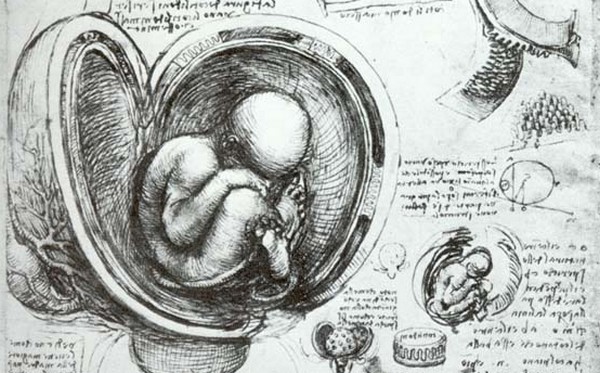
study of a womb


E

mbryology for sure was one of the most difficult subjects I took at the university. I was clueless about embryology and the human development inside the uterus. Trying to figure out just by looking at static graphics was so hard for me. When I found this material on internet I said to myself that how come I could not learn it before. So this is for those who are studying embryology for the first time and for them who just like to learn. The draw above is named "The foetus in the womb" was made by Leonardo da Vinci (c1510-12)


   Embriology Lectures Online
   Name:Human Embriology
   Source:Temple University
   Date: 2005
   Tip: you will find here presentation with audio, animations, etc, really excellent page.


   Embriology Animations Online

   Name:Human Embriology Animations
   Source:Indiana University
   Date: unknown
   Tip: animations with no audio, review system by system development.

   Name:Embryonic Folding
   Source:University of Cincinnati
   Date: 2006
   Tip: animations with audio, 3D animations.


idea


   Dare to use your computer
   If you to download Embryonic folding you can install FlashGet and the Firefox addon Flash Got. To download the movies to your PC try with Quicktime Pro to download it click here.


Apr 29, 2007

RSS: Really Simple Syndication Tutorial

0 comments

Today, I leave you here a tutorial about Really Simple Syndication (RSS). This is just an old tool, that day by day gain more users. RSS makes easier to you tracking the new content that is added to your favorites pages on internet, in consequence it allows you to save a lot of time. RSS keeps you up to date with the news you are interested in. But, why do we have to learn of all that? we are doctors, we have to learn how to cure diseases, even when I believe that we do not heal people most of the time. The way I can explain it to you, why it is important to learn about how to use internet, it is using two phrases that I found. The first it is because, “The illiterate of the 21st century will not be those who can not read and write, but those who cannot learn, unlearn, and relearn.” (by Alvin Toffler "Rethinking the Future"). This is really important, day by day new technologies are created, we just have to pick the one that fit better to our necessities, but sometimes it is really difficult to change from one service to another when we already get used to something that we like. The second reason is because, "the ability to learn faster than your competitors may be the only sustainable competitive advantage"(by Peter Senge "The Fifth Discipline"). We as doctors have to learn not only medicine, but things that can be useful in our daily life, not only for us but for our patients.


Recommended Links:

Video: RSS in Plain English
Online Education: Myth or Reality

Some Medical Journal Feeds:
New England Journal Medicine NEJM Current Issue Feed
British Medical Journal BMJ Current Issue Feed
Journal of the American Medical Association JAMA Current Issue Feed
The Lancet Current Issue Feed

Mar 6, 2007

How to Switch Browser: from IE to FIREFOX

0 comments


Most of the people use Internet Explorer to surf in the web. But the main reason for using Internet Explorer is not because this is an amazing browser but because people have never tried another browser, this is easy to explain by the fact that all the computers have IE already installed in the system when we buy a new computer, or when we go to any cybercafe and the browser that we find is explorer. The new version of explorer have taken many of the features of Firefox(i.e. like tabs); but even with those improvements, Firefox is a better and safer browser. One of the characteristics of Firefox that I like a lot is the customization, you can install as many add-ons as you want( I read that some guy install 200 and the browser works perfectly). Another thing that is important about Firefox is that is in a constant improvement, now we have the 2.0 version: but soon we will have the version 3.0. This is the first tutorial in video I made, I am showing you the basic steps you have to make to switch of browser, this is just going to take you few minutes. You also are going to learn how to install the Google Toolbar for Firefox, del.icio.us tab, Clipmarks tab, Flashgot and IE tab. In later post I will explain you how to use each of these add-ons in a really efficient manner.
note: to watch the tutorial in Spanish click here