hat's a blog carnival? It's a quick way to keep up to date on the "blogosphere" around a particular subject -- in this case, Medicine 2.0, the intersection of health care and the social Web. "A blog carnival is a type of blog event. It is similar to a magazine, in that it is dedicated to a particular topic, and is published on a regular schedule, often weekly or monthly. Each edition of a blog carnival is in the form of a blog article that contains permalinks links to other blog articles on the particular topic"(Wikipedia). And for me is an amazing way to learn from what others think, an easy way to share knowledge. Click here to go to Medicine 2.0 Blog Carnival
Oct 31, 2007
Oct 20, 2007
Web 2.0 and Medicine is about Values in Practice
Posted by Insta GC at 1:58 PM 3 comments
"Solidarity is more than give just a hand, it is more than share with a brother. It is an universal feeling that disappears borders between countries no matter believes, races or colors."
eb 2.0 and Medicine is an amazing combination. It is something that has lot of potential in our field. But Medicine and Web 2.0 - or Health 2.0 - are not only about information and technologies. It is about values that we can put on practice. Solidarity and collaboration with no interest. It is a big idea. From my point of view, they can only generate more well being for more people, and sometimes for ourselves. Last months I was working on my personal statement. It was not easy to put all my ideas in just one page. Now this work is done. But I know lot of International Medical Graduates (IMG) each year have the same problem, trying to write something good about themselves. That is why I made this post, to share some templates and guidelines that where really helpful to me. If you know about more templates or guidelines to write a personal statement, please leave your comment and the link to these resources.
Personal Statement Examples
Personal Statement for Surgery
Personal Statement for Family Medicine
Personal Statement for Internal Medicine
Personal Statement for Internal Medicine 2
Personal Statement for Internal Medicine 3
Personal Statement for Pediatrics
Personal Statement for Pediatrics 2
Personal Statement for Emergency Medicine
Personal Statement 6 Examples
Labels: Collaboration, health 2.0, IMG, International Medical Graduate, medicine, personal statement, residency, sharing, web 2.0
Bookmark this post:Aug 28, 2007
Web 2.0: Medical e-books and the Importance of Digital Literacy
Posted by Insta GC at 3:14 AM 3 commentsew weeks ago I went to UCLA Medical Center. Medical students were presenting their posters about the work they did during the summer. There were many interesting ones, but there was one that caught my attention. It was about how publishers are changing from paper publications to electronic publications during the last years. This week I read a post from K.S. Descartin. She wrote about her experience with the use of e-books and all the advantages that this fact represents. Even when I like a lot techno-gadgets. I have to admit that they still have disadvantages when compared with paper materials. While you can access lot of information with a simple click. You depend on the duration of the battery of your device to access the information you want. And actually you have to buy the gadget - what not all can afford -. And what about if the system crash. No internet connection. Have you think about that? What will happen if you can not access the information you want the moment you need it. Of course technology has lot of advantages we can not deny too. But, are we using these technologies efficiently? These things make me think about the importance of digital literacy again. And the fact there is still a lot to learn. Somehow each one of us learn about it by our own. I have not found a formal course to learn about it. I think now more than ever, with lot of information you can access if you know how, learning is a matter of motivation more than a merely passive act.
This is a funny video just to think why digital literacy really matters:
Labels: digital literacy, ebooks, health 2.0, Health Computer literacy, medicine
Bookmark this post:Aug 10, 2007
Web 2.0 : Learning Molecular Biology Online
Posted by Insta GC at 6:48 AM 0 commentsolecular Biology is for sure a really interesting subject. Here two links to amazing lectures from UC Berkeley and MIT. We can access them on internet for free. I recommend the lectures at the MIT. The lecturers not only know what they are talking about, but they show the passion they feel for this field. And sometimes this is really important to motivate students to learn. The photo above shows Linus Pauling holding models of water molecules in a classroom at the California Institute of Technology, Pasadena.
Molecular Biology Lectures Online
Name:Bio 1A General Biology Lecture
Source:UC Berkeley
Date: Spring 2007
Tip: To watch streaming video, to listen and to download MP3.
Name:Introduction to Biology
Source:MIT OPEN COURSE WARE
Date: FALL 2004
Tip: To watch streaming video click here.
Molecular Biology PowerPoint Presentation
Name:MBB 222-3 Molecular Biology and Biochemistry
Source:Simon Fraser University
Date: Fall 2003
Tip: To find PowerPoint presentation on internet with Google, type what you are looking in the search box followed by FILETYPE:PPT ( example: molecular biology filetype:ppt ).
Labels: creative commons, health 2.0, lectures, medicine, molecular biology, videos
Bookmark this post:Aug 8, 2007
Web 2.0 : An Useful Tool to Study Embryology
Posted by Insta GC at 6:49 AM 0 commentsmbryology for sure was one of the most difficult subjects I took at the university. I was clueless about embryology and the human development inside the uterus. Trying to figure out just by looking at static graphics was so hard for me. When I found this material on internet I said to myself that how come I could not learn it before. So this is for those who are studying embryology for the first time and for them who just like to learn. The draw above is named "The foetus in the womb" was made by Leonardo da Vinci (c1510-12)
Embriology Lectures Online
Name:Human Embriology
Source:Temple University
Date: 2005
Tip: you will find here presentation with audio, animations, etc, really excellent page.
Embriology Animations Online
Name:Human Embriology Animations
Source:Indiana University
Date: unknown
Tip: animations with no audio, review system by system development.
Name:Embryonic Folding
Source:University of Cincinnati
Date: 2006
Tip: animations with audio, 3D animations.
Dare to use your computer
If you to download Embryonic folding you can install FlashGet and the Firefox addon Flash Got. To download the movies to your PC try with Quicktime Pro to download it click here.
Recommended links:
Universal Leonardo
The drawings of Leonardo da Vinci
Leonardo da Vinci from bbc.co.uk
Aug 7, 2007
Web 2.0 : A tool to Study Histology by Your Own
Posted by Insta GC at 12:10 AM 1 commentsam thinking about what we can learn at home without the necessity of moving out of there, and without the necessity of spending lot of money in tuition fees, books, transportation, etc. While doing that I start with these posts. The links I put here are all around the blog, but because I notice people do not spend time checking all the blog, I decide to select the best links and share them directly with all of you. This post is about Histology, like many other courses of basic sciences I studied at medical school, I did it in black and white only, from photocopied books I could afford. Now internet allows new generation of doctors avoid this, and study from really good material they can access for free. The photo above is "Santiago Ramón y Cajal at work", to learn more about him click in the links at the end of the post.
Histology Interactive Tutorial
Name:Virtual Textbook of Interactive Histology
Source:University of Calgary
Date: 2001
Tip: You can listen audio, and watch the slides.
Histology Interactive Atlas
Name:Virtual Slidebox Histology
Source:University of Iowa Department of Anatomy and Cell Biology
Date: unknown
Tip: It is always useful to add some images we like to our work. If you want to capture the images, an useful tool you can use is FastStone Capture. It used to be a freeware, but now they make it a shareware. If you want to use the freeware version click here to download it.
I think these two pages are excellent; however for medical student it is never enough. They want to have all sources of information available, even if they can not read all the information they have in hands. For those check my histology links in del.icio.us and check this links to find histology books. Finally, this phrase that is just beautiful: "The stories condemn useless rhetoric and unquestioning obedience, the qualities Cajal found most inimical to science".
Aug 6, 2007
Web 2.0: A tool to Study Anatomy by Yourself
Posted by Insta GC at 2:54 AM 0 commentshe following is a post based on a premise "What I can learn without going to a medical school". The links posted here contain information that is available for free on internet. Anyone can watch, listen, read, capture and download -if you know how- what is there. The image above is The Anatomy Lesson of Dr. Nicolaes Tulp, oil on canvas by Rembrandt van Rijn, 1632. To learn a little bit more about this painting click here.
Anatomy Lectures:
IB 131 General Human Anatomy
source: UC Berkeley
date: Fall 2006 Course
to watch, to listen, to download audio.
streaming: General Human Anatomy Fall 2005 on Google
Anatomy Dissection Videos
Medical Gross Anatomy - Dissection Videos
source: The University of Michigan
to watch embedded in the site click here.
to download the movies to your PC try with Quicktime Pro to download it click here.
Anatomy Atlas Online
Anatomy of the Human Body
author: Henry Gray
not enough: Visit this link click here you will find more than 140 anatomy books to download or visit Del.icio.us.
Finally, I want to share with you what I read last week on the wall of a room at Sun Valley Middle School: "We do not know what we can do until we try".
Jul 3, 2007
Web 2.0: Medical Collaboration with no Borders
Posted by Insta GC at 2:42 PM 3 commentsollaboration is an interesting word. The understanding of this concept is important when we talk about the tools of Web 2.0. A definition I found in Wikipedia says, "Collaboration is a process defined by the recursive interaction of knowledge and mutual learning between two or more people who are working together, in an intellectual endeavor, toward a common goal which is typically creative in nature". The fact that there now exists new and better tools to collaborate with others -no matter the time or the place- does not mean that we have to leave the use of classical interaction with other people, but at the same time we have to recognize that the learning of the use of these tools has a tremendous potential to create new and better content and more. Web 2.0 does not mean we have to become techno-freaks, it is about using the tools that exist online to do our work more efficiently. It is about hearing others' opinions and improving our ideas. In medicine the Web 2.0 could be used to interact with other colleagues and with our patients. In medicine the access to the information and the sharing of experiences among colleagues is paramount. The Web 2.0 allows us to do that. If we learn about it, I am sure in the future doctors will not have to leave small towns -and patients- in order to remain current in their field. Because I think the place does not matter for medical practices in times of Web 2.0, or does it?
Jun 28, 2007
Not about Web 2.0 or Medicine
Posted by Insta GC at 3:02 AM 2 commentst has been a while since my last post, and this post will not be about Web 2.0 or Medicine. This post is going to be a little personal. I just got my score of my Step 2 CS that I took in L.A. in April 2nd. Now I know that I passed this test and with that I got my ECFMG certification. Therefore, there is just one test more ahead of me, but a long way to become what I want to be. "I want to be a man able to cure. I want to be a man who can serve his fellows, a man who can take lightening to those who suffer, I want to be able to give back the health to the patients and the hope to their relatives". I read this beautiful paragraph in a book named "By the River Piedra I sat down and wept" written by Paulo Coelho. While reading this book I cleared my ideas about the kind of doctor I want to become. At the same time I thought that this will not be possible without the help of really generous people I consider my friends. With this post I want to thanks all of them for their support and friendship. I also want to thank God for everything, good and bad things.
Jun 10, 2007
Using the Web to Access Medical Databases Legally
Posted by Insta GC at 3:11 AM 1 commentsomething important for a wide use of the internet and the web as a productivity tool in medicine is the fact that we have to work hard in changing the way people think. This is a really difficult task. If we take in consideration the fact that few people talk and apply the concepts of Web 2.0 to their daily routine in medicine. This is just a consequence of belonging to a system that is based on the ignorance of us. Maybe I am wrong, but I realize that when lot of people use the internet, they think that there is only one way to do something. Most of the people do not realize that internet is a universe of infinite possibilities. Most of the people do not realize that with all the world connected, the chances to find someone who has the same interest of us is really high. To demonstrate that, I am going to show you one useful example. During the month of May MD Consult offered a Open House subscription. Now the offer is ended. If you want to continue with the subscription, you have to pay for it. Is it right? The answer is NO. Do you have to look for a password that does not belong to you on internet? the answer is NO. What you have to do is to visit Promedicum, open your own account, and that is it. The web is in Spanish, if you do not read in Spanish, follow your common sense. That is paramount when using the internet in medicine. Or do you want to continue belonging to the system?
May 15, 2007
Web 2.0: The Web as a Medical Platform
Posted by Insta GC at 9:11 AM 0 commentsA
friend asked me what is the Web 2.0. I know it is not easy to explain it but I will try. Web 2.0 has many different definitions. Not all the people, who talk about it, are agree with this term. For me a definition I like is Web 2.0 is "The Web as a Platform". But what exactly this concept means? I am going to explain it in my own words, with no technical terms. The Web as a platform means that "if you want to do something with the computer you will do it online by using the browser. You do not need to install nothing or almost nothing at all in order to do that". Ten years ago each time I need to do something with the computer I follow the next steps: first I look for the software to do that, then I download the software -a huge size usually-, after that I install the software in the computer, and finally I was able to do what I was suppose to do. Now, you can do the same with your browser. You do not need a fancy operative system as Microsoft pretends to sell you its Vista. But what can you do with the browser? To explain it I am going to show you what I do with my browser.
Browser:
"A web browser is a software application that enables a user to display and interact with text, images, and other information typically located on a web page at a website on the World Wide Web or a local area network."(Wikipedia)
The first step in order to use the web as a platform is to choose the right browser. Firefox is by far better than internet explorer, more stable, safer, and it allows you total customization. If you want to learn more about why Firefox is better than IE click here. To download Firefox and to install it click here
ToolBar:
"Toolbar is a row, column, or block of onscreen buttons or icons that, when clicked, activate certain functions of the program."(Wikipedia)
Google toolbar:
Then I start with the customization of my browser. The first tool I install is Google Toolbar. There are many different toolbars you can find on internet, but this is the one I use for several reasons. To download and to install it click here
Google Toolbar Buttons:
You can customize your Google Toolbar. To do that you have to go to the right side of the bar, click in settings and then click in options. You can add or deleted features from the bar as you want. To learn about the features of the Google Toolbar click here. Here an explanation of some of the features I use:
Search only the current Web site button allows you to save a lot of time. Web sites sometimes are big that is so difficult and time consuming to find out what we are looking for. To use it you need to type your query in the search box of the toolbar and make click in the Search only the current Web site button and that's it.
Search the web for images button. Instead of open the Google Image page each time you look for an image, just type your query in the search box of the toolbar and make click in the Search the web for images button.
Gmail button allow you to access your gmail account directly by making click in this button. To open a Gmail account click here
Bookmarks button. I use this button to save pages that I like but are of my interest only, instead of saving it in my del.icio.us account where I save web pages related with medicine and internet only.
PageRank button tells you how Google assesses the importance of the page you are viewing. The parameter Google use in order to rank a page are different, but obviously as high the rank higher the chances to find good information in a page;although this is not always true.
IE tab button. For many technical reasons some pages do not look well in Firefox. Fortunately, IE tab button allow you switch from Firefox to IE without leaving Firefox.
to download this add-on and install it click here
Google Services:
With the same Google account you can use other services Google offers, you can access your information from anywhere using a computer with internet connection. To find the service or services that best fit to your necessities visit the Google Products page. Do not forget to check Google labs. Here a list of some of the services I use:
I wrote about RSS ( Really Simple Syndication) in a previous post, to keep myself updated with the news of the pages I like the most I use Google Reader. I can access to it just by clicking a button in my browser. To open an account click here
Services like this are many, some better than others. If you do not have Microsoft Office and need to type a document, this is the service you are looking for. There is no necessity to install a software you have to open an account only. To open an account click here
I use this to control the flow of my blog, to learn about what do people look in my blog, I get lot of information with this service. To open an account click here
This is a service to create a web page, It is really easy to use. To open an account click here
Google Gmail is a wonderful email service. Not only for the almost unlimited size of the account but many other features. To open an account click here
When I have an idea, but I do not want to forget it to work on it later on, I use this service. To open an account click here
Now to create a blog is easier than years before. I use blogger in order to do that. To open an account click here
Bookmark Toolbar Folder:
With Firefox you can put direct links to you favorites page in the browser, so you can access this pages just by making click on the buttons. Here some direct links to pages I use:
With huge amounts of information on internet, we have to learn how to save it, for article from different journals I read I use my Connotea account.
to open an account click hereTo share my presentations online I use SlideShare, I access my account just by make click in this button. To open an account click here
I put a direct link in my browser to my blog, but you can put any page you like here in the bookmark toolbar folder.
Firefox Addons:
"Add-ons are small pieces of software that can add new features or tiny tweaks to your Firefox." You can customize your browser as you want and install as many add-ons as you want. Once I read a guy installed two hundred add-ons and Firefox still worked fine. You do not need to install all of them, just the ones that you need. Visit the Firefox Add-on page to find the right tool you would like to install. Here a list of the ones I use:
Del.icio.us another service to save your bookmarks online, this add-on make it easy to save and to access you del.icio.us account at any time from your browser. To download and install click here
Sometimes while reading a page, watching a video or whatever we are doing while surfing the web, we find information that we consider useful for us, but we just want to save a segment of the page. Clipmarks allow you to do that. To open an account and to install the buttons click here
Flashgot is an useful download manager, for example it allow you to save those streaming videos you like but you can not save. To download and install click here
I tried to keep it simple but I realize I did not do well. It seems a complicated process to customize your browser, but if you paid a lot of money to have a computer, why not to get to maximum benefit from it.
May 6, 2007
Web 2.0 and Medicine : Medicine 2.0
Posted by Insta GC at 3:41 PM 0 comments
A lot of people that I talk to still do not know what is the web 2.0 and do not realize how web 2.0 can be related or can be used to improve our knowledge and practice in medicine. Indeed, some people say that a doctor must be, in a hospital or in a clinic, writing prescriptions instead of being writing in front of a computer about Web 2.0. I made this presentation taking two presentations as references, the presentation of Dean Giustini about "How Web 2.0 is changing medicine" and the presentation of Bertalan Meskó about "Medicine 2.0". As we know medicine is a science and art, and to be a doctor means to know not only about medicine. But, what is web 2.0 ? what web 2.0 is about? what web 2.0 services exist? How web 2.0 can be related with medicine ? To define it, I want to use a non-technical definition, web 2.0 is just the technology anyone can use to share, to create, and to collaborate with others. It is not about the name we have to take care about, but about the fact that it is something that will form part of our daily life. For us, as doctors, the integration of web 2.0 and medicine will lead to something we could name Medicine 2.0, or a new way to see the practice of medicine. Because Medicine 2.0 is about realizing the potential of today's technology in healthcare, it is about working together, it is about getting closer to other colleagues and patients. The use of these technologies will allow us to save time, to share knowledge and experiences, to create knowledge, to collaborate and to participate with others. In such a way, we will have more time to spend involving in the humanistic part of medicine.
Recommended links:
Medicine 2.0 : A slideshow of a new era
How Web 2.0 is changing medicine
Apr 30, 2007
Mashup Google Video and SlideShare Presentation: Zentation
Posted by Insta GC at 8:50 PM 0 comments
I uploaded the PowerPoint presentation of Dean Giustini about "How Web 2.0 is Changing Medicine" to SlideShare some days ago.The presentation is great, and Dean Giustini summarizes his ideas in an incredible way, but it would be interesting to listen what Dean Giustini said at the National Library of Medicine during his presentation. Is it possible to do that without money? Is it possible to do that without training? Do we have to spend lot of time to make it possible? Do we have to possess supercomputers to do the work for us? The answer is no. We just have to find the right tool to do that. Presentations on-line certainly are a really useful tool for doctors, an example of great presentations online, with video and diapositives at the same time, can be found at Johns Hopkins Division of Infectious Diseases Pre-Recorded Infectious Diseases Grand Rounds, the first time I saw it I was just amazed. Video and PowerPoint presentation simultaneously displayed. I tried to do something similar, but the work and time I had to spend doing that did not worth. This week I found Zentation , it is a tool that allow me do that, I can syncronize a video on Google Video with a PowerPoint presentation on SlideShare. In other words, Zentation is a Mashup - A mashup is a website or application that combines content from more than one source into an integrated experience. - It is really simple to use, and like every product of the Web 2.0 it is FREE. It is still beta, but you can use it. Take a look to the example showed below.
|
Recommended Links:
Web 2.0 pilgrimage to Washington, DC
How Web 2.0 is Changing Medicine
Presentations Online:
SlideShare
authorSTREAM
Slideburner
Zentation
Apr 26, 2007
ooVoo: Video Web Conferencing
Posted by Insta GC at 7:09 AM 1 comments
Communication is now really easy in comparison to past years. You only need a web cam, a computer and lot of creativity. It is not necessary to have a million dollar to have a video conference or to do lot of things with the Web 2.0 as Dean Giustini mention in his blog. ooVoo, an IM/Video conferencing tool, is just awesome. It is now beta. It works as a messenger program like Windows Live Messenger or Yahoo Messenger, but what make it special is the fact that you can make video calls, video conference( up to 5 persons at the same time), video messaging and upload your videos to their server to embedded messages in your forum or blog. I think that ooVoo will be more useful than Skype and other messenger programs. Companies are working hard to offer this type of service, Google just bought Marratech to offer this service in the future. Try it now, you will not be disappointed.
ooVoo links
ooVoo Main Page
ooVoo Tutorial
ooVoo Download
Recommended links:
Our Vision? A new, digital literacy
Free Web based Meetings: A Web 2.0 Tool to Connect Doctors
Before You Participate in a Web Conference
Apr 24, 2007
Bookmarking: Learning 2.0 and Del.icio.us
Posted by Insta GC at 6:37 AM 0 commentsDel.icio.us is a useful productivity tool, a lot people like librarians use it in a very efficient manner. As the information in the web grows and grows without stooping , it is essential to learn how to find and how to organize this information, the use of del.icio.us allow us to find what others consider important to save, in other words is the people who decide what matters and what not. This is a video I found in Brightcove, another video host site like You Tube, the quality it is not good but the content is great.
Other links:
Del.icio.us
How to use Del.icio.us Tutorial
Medical Pages on Del.icio.us
Social Bookmarking Del.icio.us: A Personal and Professional Productivity Tool
Apr 22, 2007
Free Web Based Meetings: A Web 2.0 tool to Connect Doctors
Posted by Insta GC at 7:57 PM 0 comments
We talk a lot of Web 2.0 and the use of the web as a platform, what is it? in simple words it means that you do not need to install a big software in your computer to do whatever you could wish, in consequence, more than a powerful computer with a super powerful operative system (as Windows Vista pretends to be), what we need is broadband internet connection. In our case, communication is paramount, most of us know how to use a messenger program like Windows Live Messenger, or Yahoo Messenger, etc. But these are not the only programs that exist to talk to other people, and is not the only thing you can do with your computer and internet, you can do much more and do not to have to spend lot of hours trying to learn it. So, is it with the use of messenger programs the only way we can discuss with other colleagues? The answer is no. For example we can use live meeting conferences, what is a live meeting conference? what can you do? check these demos to have a better idea about it: Microsoft demo or Adobe demo. After you watch these demos you will have a better idea of what a live meeting is for, but do you have to pay for that? the answer is no. You just have to be creative. I am going to tell you how: first of all use a program to talk with more than one person at a time, for that I use Skype, then define what you want to do; for most of us something that will be useful is to show to others what you see in your screen, so why not to share your screen with others(while talking with Skype), to do that use Yugma, you and the people you want to share your screen with have to have an account, at any time you can decide who is the one who will show the screen to the others. If you would like to have something like a whiteboard where to write you can use Vyew, you can do annotations, upload PowerPoint presentation, invite more people( up to 20 for Free), but every person has to open an account( what is free) . Or maybe if you just wan to have a whiteboard but do not want to open a account you can use Skrbl, no necessity to open account or install nothing. So why not to use these tools to interact dynamically with others doctors, for example to discuss clinical cases, I think that the possibilities are endless.
Free Live Conferencing Services
Yugma
Vyew
Skype
Payed Services
Gotomeeting
Webex
Office Live Meeting
Genesys
Adobe Connect Professional
Whiteboard:
Skrbl
Apr 20, 2007
Web 2.0: Openness to Medical Knowledge
Posted by Insta GC at 8:59 AM 1 comments
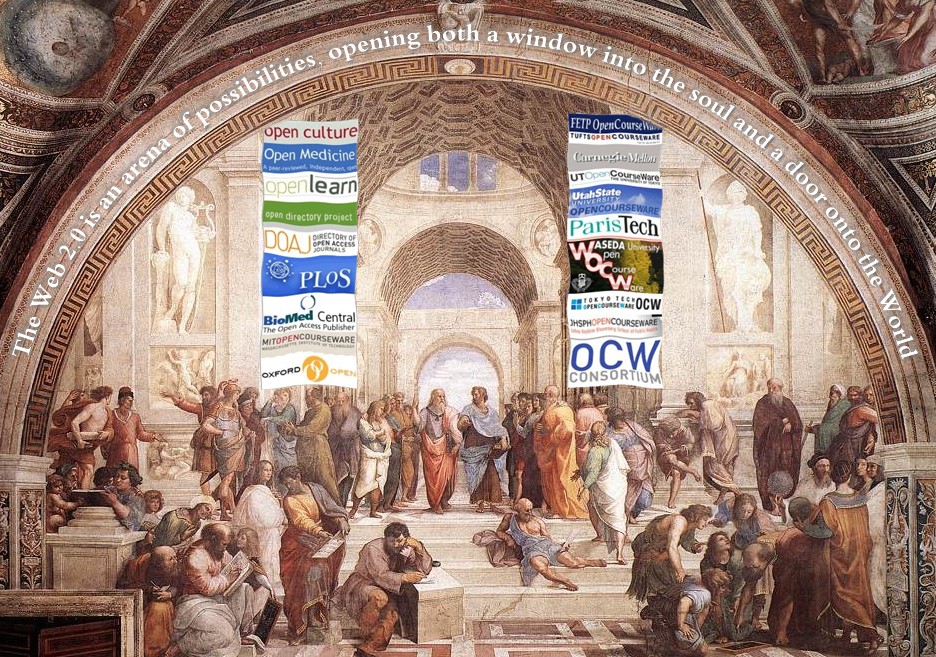
Anywhere I look in internet, I find a trend to openness: Open Access, Open Medicine, Open Course Ware, Open Culture,Open Learn, Open Source, Open Directory, Open Office, etc; what in my opinion it is an amazing change with respect to past years. The information is there, if we want it, we have to take it. As doctors the principal beneficiary of this action will be our patients. But, the most difficult challenge is still ahead of us: The challenge to "Open Our Minds" to the change. We have to plant the seed that stimulates thirst of knowledge and happiness of learning. Now exists a huge gateway of knowledge opens to anyone who wants to learn; but most of us are standing in front of it and do not realize that it exists, or if we know of its existence, we do not cross the door to use the knowledge it contains. Technology can create the misconception that it limits the interaction among people, and it could happen if we become extremists with the use of it, but on the contrary it is the tool will help us to back to the basics of education, an education that teacher and apprentice will be closer than ever. Finally, I want to share with you a phrase of Rita Dove that I found, she says "the library is an arena of possibility, opening both a window into the soul and a door onto the world" , now we do not have to go to a library to access the information we need; but the librarians are still there to help us, as guides to the knowledge that will enrich our minds.
References:
Our Vision? A new, digital literacy
Why Open Medicine?
Technology and 3 Types of Teachers
Open Sites:
ODP - Open Directory Project
SourceForge.net: Welcome to SourceForge.net
Home | Open Source Initiative
Open Culture
Open Medicine
OpenLearn LearningSpace - The Open University
Oxford Open initiative
Open Access Now
Open Access Defined
Directory of Open Access Journals
Open Course Ware Resources:
MIT's OpenCourseWare
Waseda University's OpenCourseWare
Utah State OpenCourseWare
UT's OpenCourseWare
Universia Open Course Ware MIT spanish
Tufts OpenCourseWare
TOKYO TECH OCW
ParisTech Open Course Ware
OCW Finder
Johns Hopkins Bloomberg School of Public Health's OPENCOURSEWARE
Carnegie Mellon's Open Learning Initiative
KYOTO-U's OpenCourseWare
Keio University's Opencourseware
Fulbright Economics Teaching Program OWC
MERLOT Multimedia Educational Resource for Learning and Online Teaching
Apr 17, 2007
How Web 2.0 is Changing Medicine
Posted by Insta GC at 5:43 PM 0 comments
How web 2.0 will change medicine?, How web 2.0 can change medicine?, How Web 2.0 is changing Medicine?, how web 2.0 will transform medicine?, While it is not easy to answer these questions, I just can say that it will happen sooner or later. But what is Web 2.0? How medicine is related to the learning of computer skills? Most medical doctors spend seven to eight years, on average, at medical school; but most of us never took any classes on these technologies. I agree with Guistini when he says that is difficult to define the Web 2.0, but what I know for sure is that Web 2.0 is about knowing how to share and how to collaborate with others to create new and better content.
I have received a ppt presentation from Dean Giustini. While I don't know him, I read the article he wrote in December in the British Medical Journal about "How Web 2.0 is Changing Medicine". I just want to thank him for his presentation about this topic. I like what he wrote in his article: "the spirit of open sharing and collaboration is paramount", and he is right, because all is about that in the Web 2.0, share with no interest, maybe it could sound like a romantic idea, but it is true.
Finally, I just want to remark his conclusions:
1.- Physicians should learn about the vast ecosystem of the web
2.- Web 2.0 is not a fad, but is changing the way patients and physicians interact
3.- Wikis and blogs help doctors to communicate, collaborate and participate more
4.- Software tools help physicians to form digital communities of practice
5.- In the future, physicians will publish in the absence of associations or affiliations.
Download the presentation as:
Related links:
How Web 2.0 is Changing Medicine
Web 2.0 pilgrimage to Washington, DC